


News and Events
Multi-Factor Access Control Systems Philippines: Strengthening Security for Restricted Areas
What Are Multi-Factor Access Control Systems?
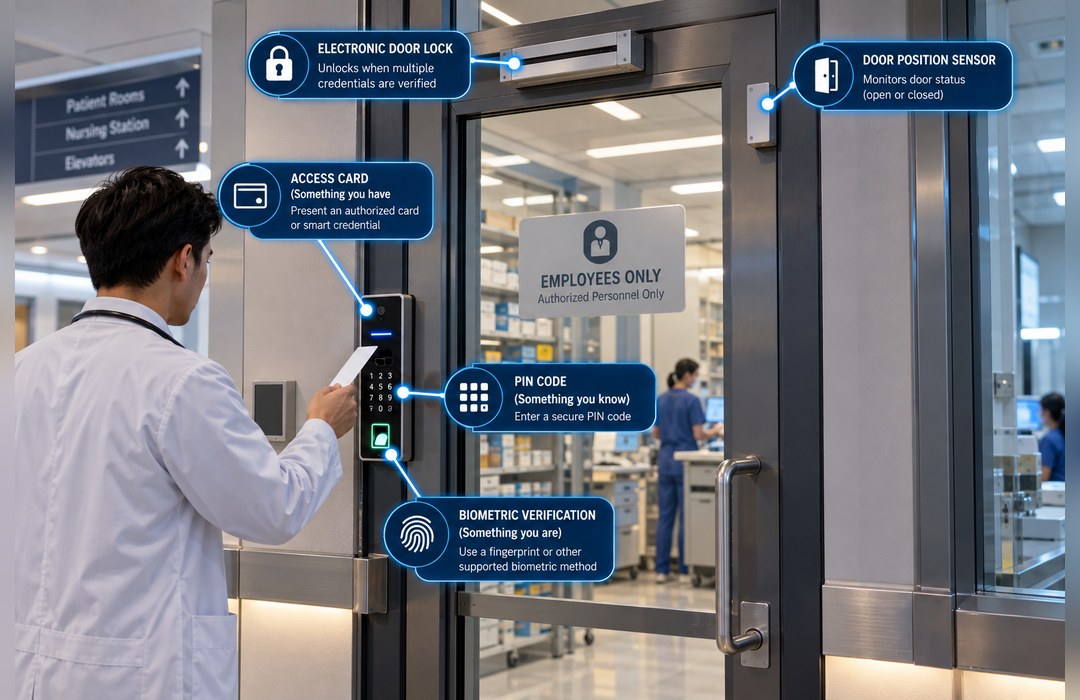
Multi-Factor Access Control Systems Philippines are physical security solutions that require users to provide two or more forms of authentication before entry is granted to a controlled area. Instead of relying on a single card, PIN, or biometric credential, the system verifies multiple factors as part of the same access sequence.
A typical configuration may combine something the user has, such as an access card or smart credential, with something the user knows, such as a PIN, or something associated with the user, such as a fingerprint or other supported biometric characteristic. The exact combination depends on the selected access control platform and the security requirements of the facility.
Multi-factor access can be applied to data centers, server rooms, laboratories, control rooms, restricted offices, storage areas, and other locations where stronger identity verification is appropriate.
Foxcon Total Solutions, Inc. provides access control, biometric security, CCTV, electronic locking, and integrated security solutions for commercial and enterprise environments.
Why Choose Multi-Factor Access Control Systems?
Not every door within a facility carries the same level of risk. General employee entrances may only require a standard credential, while rooms containing critical IT systems, sensitive records, valuable assets, or operational equipment may require stronger verification.
Multi-Factor Access Control Systems Philippines add another layer of authentication before the electronic locking hardware is released. If an access card is lost, copied, shared, or used by another person, the system can still require a second valid factor before granting entry.
This approach can also be applied selectively. Organizations do not need to introduce multiple authentication steps at every controlled door; higher-security verification can be reserved for areas where the consequences of unauthorized access are greater.
Multi-factor access can complement Biometric Access Control Solutions, Electronic Door Lock Systems, Door Access Controller Systems, Visitor Management Systems, CCTV Surveillance Systems, and Building Security Integration.
How Multi-Factor Access Control Systems Work
A multi-factor access point typically combines compatible readers, credentials, an access controller, electronic locking hardware, and management software. When a user approaches the controlled door, the system requires the configured authentication sequence before processing the final access decision.
For example, a user may first present an authorized card. Rather than unlocking the door immediately, the controller may require a PIN or fingerprint verification. Only when all required authentication conditions are satisfied does the controller send the command to release the electronic lock.
The system can also evaluate normal access permissions such as user role, door assignment, time schedule, or access level in addition to the authentication factors. A user may therefore provide two valid credentials and still be denied if that person is not authorized for the specific door or time period.
Compatible management platforms can record authentication and door events for later review. Where supported, access events may also be associated with CCTV footage, alarms, or other security information through an integrated security environment.
Multi-Factor Access Control Systems Safety & Trust
Multi-factor authentication should be applied according to actual security risk rather than simply adding more steps to every entrance. Excessive authentication at low-risk doors can slow movement, frustrate users, and encourage workarounds without providing meaningful additional protection.
Organizations should define which areas require enhanced authentication and select factors that are practical for those users and operating conditions. Biometric systems also require careful handling of enrollment data, administrative permissions, retention, and privacy practices according to applicable organizational and legal requirements.
The complete door design must still preserve required emergency egress and life-safety behavior. Stronger authentication controls should apply to entry without preventing occupants from leaving a space when emergency exit is required.
Foxcon Total Solutions, Inc. supports security projects through Engineering and Design, Supply and Installation, System Integration, Testing and Commissioning, Preventive Maintenance, and related technical services.
Multi-Factor Access Control Systems Tips
-
Apply MFA where the risk justifies it. Prioritize server rooms, control rooms, laboratories, and other restricted areas.
-
Use genuinely different factors where possible. Two cards are not equivalent to combining a card with a PIN or biometric factor.
-
Define access permissions separately. Multiple credentials should not replace role- and door-based authorization.
-
Coordinate readers and controllers. Confirm that the selected hardware supports the intended authentication sequence.
-
Protect biometric information. Restrict access to enrollment and management functions.
-
Plan for authentication failure. Define how legitimate users are handled when a credential cannot be verified.
-
Maintain emergency egress. Entry security must not interfere with required exit functions.
-
Review permissions regularly. Remove access when roles or employment conditions change.
-
Test the complete sequence. Verify every factor, controller decision, lock release, and event record.
Use Multiple Factors Only Where They Add Meaningful Security
Adding another credential does not automatically make every access point more secure. The value of multi-factor authentication depends on using factors that provide genuinely different forms of verification and applying them to locations where stronger identity assurance is needed.
For example, requiring an access card followed by a PIN creates an additional barrier if the card is lost or borrowed. Combining a card with biometric verification can provide another method of confirming that the person presenting the credential is the enrolled user, depending on the selected technology.
The security design should also consider operational consequences. A high-security server room may justify additional authentication, while requiring the same process at a frequently used general office entrance could create unnecessary delays.
Risk-based deployment allows organizations to strengthen critical access points without making the entire building unnecessarily difficult to use.
Frequently Asked Questions
What is multi-factor access control?
Multi-factor access control requires users to complete two or more authentication steps before a physical access point is permitted to unlock.
What authentication methods can be combined?
Depending on system compatibility, combinations may include access cards, smart credentials, PIN codes, fingerprints, facial or other supported biometric methods, and additional authentication technologies.
Is multi-factor access required for every door?
No. It can be applied selectively to higher-security areas while general access points continue using standard authentication.
Is using two access cards considered multi-factor authentication?
Not necessarily. Stronger multi-factor authentication normally combines different categories of authentication rather than simply asking for two credentials of the same type.
Can multi-factor access integrate with CCTV?
Yes. Compatible access control and surveillance platforms may associate access events with corresponding CCTV video for review or investigation.
Can multi-factor authentication prevent all unauthorized entry?
No. It can strengthen credential verification, but physical security also depends on door hardware, system configuration, anti-tailgating practices, user behavior, monitoring, and other controls.
Where can Multi-Factor Access Control Systems be used?
They can be considered for data centers, server rooms, control rooms, laboratories, restricted offices, records rooms, storage facilities, and other higher-security locations.
What happens if one authentication factor fails?
The result depends on the configured policy. Access may be denied, the user may need an approved recovery process, or authorized personnel may need to investigate the failed credential.
Test Every Authentication Factor Before Testing the Door
When a multi-factor access point fails, it can be difficult to determine whether the problem comes from the card reader, biometric reader, PIN interface, access controller, user permissions, or electronic lock. Testing only whether the door eventually opens does not identify which part of the sequence is unreliable.
Commissioning should verify each factor individually before testing the complete authentication workflow. The first credential should be recognized correctly, the second factor should be requested at the correct stage, and the controller should only release the door after all required conditions are satisfied.
Negative tests are equally important. Technical teams should confirm that an invalid card combined with a valid fingerprint does not produce access, and that a valid card combined with an incorrect PIN or unrecognized biometric factor is handled according to the configured policy.
Testing both successful and failed authentication scenarios helps confirm that the system enforces the intended security logic rather than simply operating the lock.
Strengthen the Highest-Risk Doors Without Complicating Every Entrance
A properly planned Multi-Factor Access Control Systems Philippines environment should coordinate authentication factors, user permissions, readers, controllers, electronic locks, biometric data, emergency egress, event logging, CCTV integration, and administrative controls as one complete physical security strategy.
Foxcon Total Solutions, Inc. can support multi-factor access planning, biometric and credential integration, electronic locking, access control deployment, CCTV integration, testing, commissioning, documentation, and preventive maintenance for commercial and enterprise facilities.
📞 Contact us today to discuss your multi-factor access control and restricted-area security requirements.
📍 Serving businesses in Cebu, Metro Manila, and nationwide.
🌐 Explore Foxcon’s solutions to learn more about our services.
References
1. miniOrange – Multi-Factor Authentication Solutions
https://www.miniorange.com/lp/multi-factor-authentication
2. CDVI – Multi-Factor Authentication for Access Control
https://www.cdvi.co.uk/blog-multi-factor-authentication-strengthening-access-control-in-an-era-of-security-threats/
3. CISA – Multifactor Authentication
https://www.cisa.gov/topics/cybersecurity-best-practices/multifactor-authentication
4. ResearchGate – Access Control Framework Using Multi-Factor Authentication
https://www.researchgate.net/publication/330208949_Access_Control_Framework_Using_Multi-Factor_Authentication_in_Cloud_Computing
5. Matrix Comsec – Multi-Factor Authentication for Physical Access Control
https://www.matrixcomsec.com/multi-factor-authentication-physical-access-control/