


News and Events
Audio Visual Solutions Philippines: Transforming Business Communication Through Integrated AV Technology
What Are Audio Visual Solutions?
Audio Visual Solutions Philippines combine sound, video, displays, conferencing equipment, and control technology to support communication and collaboration in commercial spaces. The goal is not simply to install screens and speakers, but to make the equipment in a room work together in a practical and easy-to-use setup.
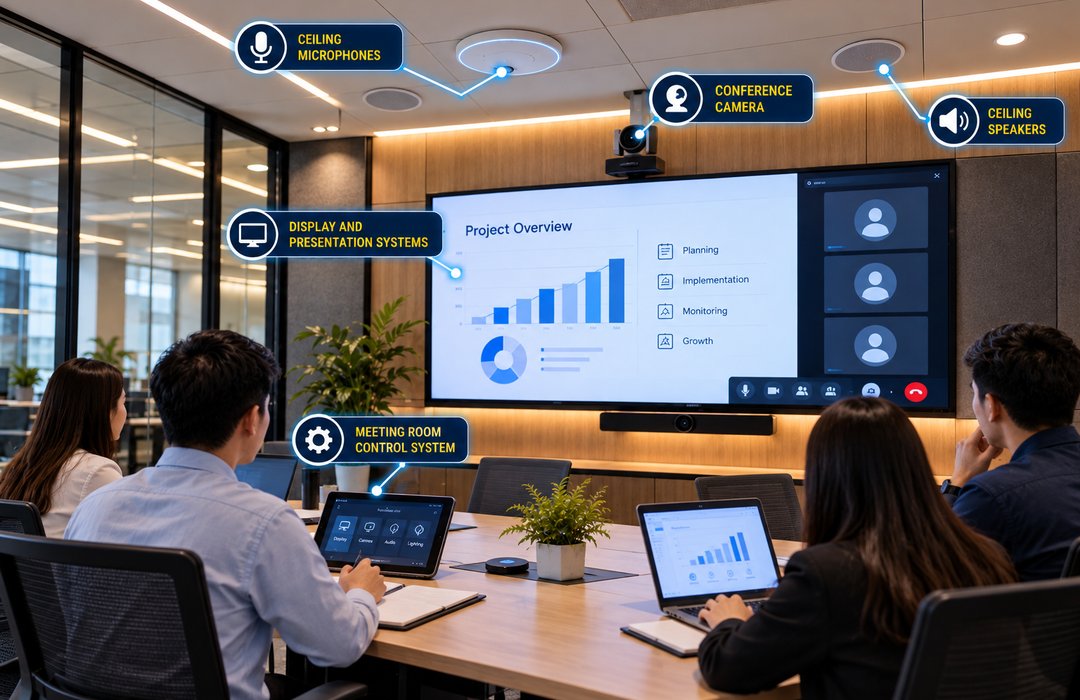
An AV setup can include professional displays, projectors, microphones, speakers, cameras, digital signage, wireless presentation devices, video or LED walls, and meeting room controls. The exact combination depends on how the space will be used. Philippine AV providers also offer interactive displays, room management tools, professional audio, projection systems, and integrated meeting room technologies as part of commercial AV projects.
For example, a boardroom may need cameras, microphones, speakers, displays, and video conferencing equipment. A reception area may only require digital signage, while an auditorium needs a different approach to sound and visual coverage.
Foxcon Total Solutions, Inc. provides Audio Visual Solutions for offices, conference rooms, educational institutions, healthcare facilities, hotels, retail spaces, and other commercial environments.
Why Choose Audio Visual Solutions?
A meeting can lose momentum when people cannot hear the speaker, remote participants cannot follow the discussion, or employees spend too much time trying to connect a laptop to the display.
A properly planned Audio Visual Solution addresses these everyday problems by designing the equipment around the room and the people who will use it.
For meeting and training spaces, this can mean making presentations easier to share while ensuring that both in-room and remote participants can see and hear clearly. AV integration can also connect meeting room equipment with an organization’s existing IT network and collaboration tools.
AV is not limited to meetings. Commercial facilities can use professional displays and digital signage for announcements, directions, schedules, promotions, and other information. Public Address and Background Music systems can support announcements and audio across larger spaces, while interactive displays can support discussions and training. The goal is to provide technology that supports communication without making everyday tasks more complicated.
How Audio Visual Solutions Work
Planning begins with the space itself. Room dimensions, seating arrangement, number of users, lighting, acoustics, presentation requirements, and existing network connections all affect the equipment that should be selected.
Displays or projectors provide visual output, while microphones capture voices and speakers deliver sound throughout the room. Cameras support video meetings, and presentation equipment allows users to share content from laptops or other compatible devices.
A control system can bring several of these functions together. Instead of adjusting individual pieces of equipment separately, users may be able to manage displays, audio, presentation sources, and other room functions through a common interface. Integrated control is commonly used in professional meeting rooms, boardrooms, and training spaces.
AV equipment can also operate over an organization’s network. This can make it easier to connect rooms, distribute content, and manage compatible equipment across a larger facility when the network has been properly designed for those requirements.
Audio Visual Solutions Safety & Trust
Good AV design starts with choosing equipment that fits the space rather than simply selecting the newest or most expensive products. A large display may be unnecessary in a small meeting room, while inadequate microphone coverage can make a large conference room difficult to use.
Compatibility also matters. Cameras, microphones, displays, control equipment, conferencing platforms, and network infrastructure need to work together reliably. Commercial AV integration often involves coordinating AV equipment with IT infrastructure rather than treating the two as completely separate systems.
Installation should also account for secure mounting, organized cabling, power requirements, ventilation, and equipment accessibility. These details are important when systems need to be inspected, serviced, or upgraded later. Software and firmware should be kept current, particularly for conferencing and network-connected equipment. Regular testing can identify problems with microphones, displays, cameras, connections, and control equipment before they interrupt a meeting or presentation.
Foxcon Total Solutions, Inc. can support AV projects through system planning, installation, integration, testing, commissioning, preventive maintenance, and technical support.
Audio Visual Solutions Tips
-
Design the system around how the room will actually be used.
-
Check viewing distance and seating positions before choosing display size and placement.
-
Pay attention to microphone coverage, especially in larger meeting and training rooms.
-
Keep controls simple enough for employees to operate without constant technical assistance.
-
Consider wireless presentation options when users frequently bring different laptops or mobile devices into the room.
-
Coordinate AV requirements with the existing IT network before installing network-connected equipment.
-
Leave room for additional cameras, displays, microphones, or other equipment if the space may expand.
-
Test conferencing, audio, video, and presentation functions regularly instead of waiting for a problem during a meeting.
Build AV Around the Room, Not the Equipment List
Two conference rooms of the same size do not necessarily need the same AV setup. One may be used primarily for internal presentations, while another may host daily video meetings with clients and remote employees.
That difference should influence everything from camera placement and microphone coverage to display positioning and room controls.
The same principle applies outside conference rooms. Training areas may benefit from interactive displays, reception areas may need digital signage, and larger venues may require professional audio, projection, or LED display systems. Commercial AV solutions cover these different applications rather than treating AV as a single type of installation.
A professional assessment can determine which equipment is useful for the space, how it should be positioned, and how the different components should connect. This helps avoid installing equipment that does not match how the space will actually be used.
Frequently Asked Questions
What are Audio Visual Solutions?
Audio Visual Solutions combine audio, video, display, and control technologies into an integrated system that supports business communication, presentations, video conferencing, training, and information sharing.
What equipment is included in an Audio Visual System?
An Audio Visual System may include displays, LED video walls, projectors, speakers, microphones, cameras, video conferencing equipment, digital signage, wireless presentation devices, and centralized control systems. The equipment selected depends on the specific requirements of the facility.
Where are Audio Visual Solutions commonly used?
Audio Visual Solutions are commonly used in offices, boardrooms, educational institutions, hospitals, hotels, retail establishments, conference centers, government facilities, and other commercial environments that require effective communication and collaboration.
Can Audio Visual Systems integrate with other technologies?
Yes. Modern Audio Visual Solutions can integrate with video conferencing platforms, IT networks, digital signage, Building Management Systems (BMS), room scheduling systems, and other workplace technologies to create a more connected setup.
Why is professional AV system integration important?
Professional integration helps audio, video, and control components work together reliably. Proper system design also improves usability, reduces technical issues, and supports future expansion as business requirements change.
How often should an Audio Visual System be maintained?
Routine inspections, equipment cleaning, firmware updates, software upgrades, and performance testing should be performed regularly to maintain system reliability and consistent performance during daily operations.
Transform Your Space With Better Audio Visual Solutions
Create more effective meeting, presentation, and communication spaces with integrated Audio Visual Solutions. From displays and sound systems to conference room technologies and control systems, Foxcon Total Solutions, Inc. can support your AV requirements from planning through installation and testing.
📞 Contact us today to discuss your audio visual project.
📍 Serving businesses in Cebu, Metro Manila, and nationwide.
🌐 Explore Foxcon’s solutions to learn more about our services.
References
-
Microdata Systems and Management Inc. – Audio-Visual Solutions
https://microdata.com.ph/solution/audio-visual/ -
AMTI – Audio-Visual Systems Integration
https://amti.com.ph/audio-visual-systems-integration/ -
Philippine Association of National Advertisers – Audio-Video Solutions Corporation
https://pana.com.ph/pana-member/audio-video-solutions-corporation/ -
AV Institute
https://www.avinstitute.net/ -
Audio Visual Driver International (AVDI)
https://www.avdi.com.ph/