


News and Events
Digital Signage Solutions Philippines: Making Business Communication More Timely and Visible
What Are Digital Signage Solutions?
Digital Signage Solutions Philippines use screens to display information that can be changed without replacing printed signs, posters, or boards. Businesses can use them for promotions, announcements, directions, schedules, menus, employee updates, safety reminders, and other information that needs to stay current.
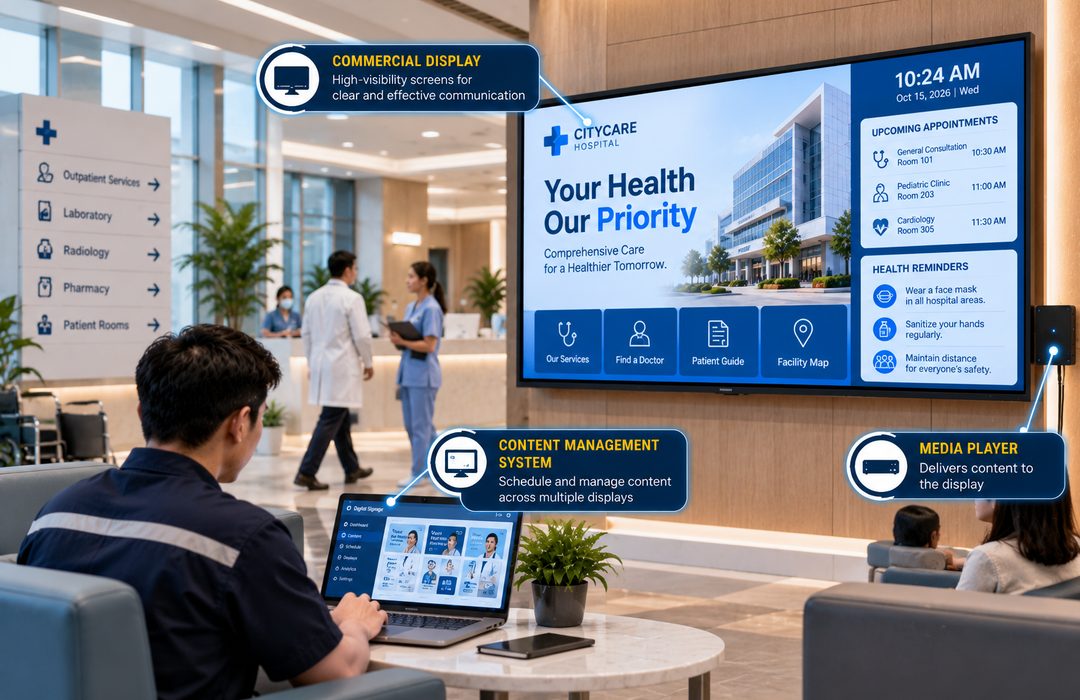
A typical setup includes a commercial display, a media player or built-in playback system, content management software, and a network connection. Together, these components allow authorized users to decide what appears on each screen and when it should be shown.
The biggest difference from traditional signage is control. A printed poster stays the same until someone physically replaces it. With digital signage, a company can update a promotion, change a schedule, correct information, or publish an urgent announcement without going to every display.
Foxcon Total Solutions, Inc. provides Digital Signage Solutions for offices, retail stores, shopping centers, hotels, hospitals, schools, transportation facilities, government offices, and other commercial environments.
Why Choose Digital Signage Solutions?
Information changes quickly. A hotel may need to update event schedules throughout the day. A retail store may run different promotions in the morning and evening. An office may need to replace a company announcement or meeting notice without printing another set of materials.
Digital Signage Solutions make those changes easier to handle.
One management platform can control content across several screens, which is useful for businesses with displays on different floors, departments, branches, or locations. Administrators can prepare content in advance and decide when it should appear instead of changing each screen manually.
Digital signage can also display more than one type of content. A screen can rotate between announcements, videos, schedules, promotions, and other information instead of being limited to a single message. For customers and visitors, this gives businesses a practical way to keep information visible in the places where people are most likely to need it. For employees, the same technology can support internal announcements, safety reminders, performance information, and company updates.
How Digital Signage Solutions Work
The process starts with the content. This may be an image, video, announcement, menu, schedule, presentation, dashboard, or another supported format.
Authorized users upload the material to a content management platform and decide which screen should show it. They can also set dates and times so content appears automatically according to a schedule.
A media player then sends the selected content to the display. Some commercial displays have this function built into the screen, while other installations use a separate media player.
When several displays are connected to the same management platform, they do not all need to show the same thing. A company can send one message to reception, another to a customer area, and a different set of information to employee spaces. Network connectivity also makes remote changes possible. Instead of visiting each screen, an authorized user can update the content from the management platform and send the new material to the selected displays.
Digital Signage Solutions Safety & Trust
A digital signage project should start with where the screen will be installed and what people need to see from that location. Screen size alone does not determine whether the message will be effective. Viewing distance, mounting height, surrounding light, traffic flow, and the amount of time people spend near the display all affect how easy the content is to read.
Commercial displays should also be selected according to how long they are expected to operate each day. A screen used for a few hours in a meeting room has different demands from one expected to run throughout business hours in a hotel lobby, retail store, or transportation facility.
The management platform also requires proper access control. Only authorized personnel should be able to publish or change content, especially when the displays are used for customer-facing information or important internal announcements.
Physical installation matters as well. Screens need secure mounting, suitable power connections, proper ventilation, and access for maintenance. Displays, media players, network connections, and software should be checked regularly so problems can be addressed before screens are left blank, frozen, or showing outdated information.
Digital Signage Solutions Tips
-
Decide what each display is supposed to accomplish before choosing its size or location.
-
Keep messages short enough to understand while people are passing by.
-
Avoid putting too much text on one screen.
-
Check readability from the actual viewing distance rather than only reviewing content on a computer.
-
Schedule promotions and announcements so outdated information disappears automatically.
-
Assign content management access only to employees responsible for updating the screens.
-
Use different playlists for locations that serve different audiences.
-
Check screens throughout the day for glare or lighting conditions that may affect visibility.
-
Keep commonly used templates consistent so new content is faster to prepare.
-
Test displays, media players, software, and network connections regularly.
Put Useful Information Where People Will Actually See It
A digital display should not become a television mounted on a wall simply because the technology is available. The location and content need a clear purpose.
A screen near an office reception area might show visitor instructions, company announcements, or meeting information. Inside a retail store, the same technology could highlight current offers or product information. A hospital may use screens for directions and service information, while a hotel can update function schedules without replacing printed boards throughout the day.
Content timing matters, too. Showing a breakfast promotion late in the afternoon or an expired event schedule makes the display less useful and can confuse the audience.
A professional assessment can help determine screen locations, viewing distances, display specifications, mounting requirements, content management needs, network connectivity, and how many screens should be controlled from the same platform. The goal is not to install the most displays. It is to place the right information where customers, employees, or visitors are most likely to notice and use it.
Frequently Asked Questions
What are Digital Signage Solutions?
Digital Signage Solutions are communication systems that use digital displays to present announcements, advertisements, schedules, directions, videos, and other visual content that can be managed and updated remotely.
Where are Digital Signage Solutions commonly used?
Digital Signage Solutions are commonly used in offices, retail stores, shopping malls, hotels, hospitals, schools, airports, transportation terminals, restaurants, government offices, and other commercial facilities.
What content can be displayed on digital signage?
Digital signage can display promotional materials, company announcements, videos, live dashboards, event schedules, emergency notifications, wayfinding information, menus, and other multimedia content depending on the organization’s needs.
Can Digital Signage Solutions be managed remotely?
Yes. Most modern Digital Signage Solutions include centralized content management software that allows administrators to update content, schedule playlists, monitor displays, and manage multiple locations remotely.
Can Digital Signage integrate with other business systems?
Yes. Digital Signage Solutions can integrate with content management platforms, meeting room schedules, business dashboards, emergency notification systems, Building Management Systems (BMS), and other connected technologies to display real-time information.
Why is preventive maintenance important for Digital Signage Solutions?
Routine inspections, software updates, display cleaning, hardware testing, and preventive maintenance help ensure screens, media players, network connections, and content management systems continue operating reliably while extending the lifespan of the equipment.
Reach Customers and Visitors With Clearer Visual Messaging
Make your content more dynamic with professionally planned Digital Signage Solutions. From display systems and content distribution to installation, integration, testing, and maintenance, Foxcon Total Solutions, Inc. can help create a digital signage environment suited to your facility.
📞 Contact us today to discuss your digital signage requirements.
📍 Serving businesses in Cebu, Metro Manila, and nationwide.
🌐 Explore Foxcon’s solutions to learn more about our services.
References
-
FRAMR – Digital Signage Software
https://framr.tv/en/blog/digital-signage-software/ -
Yodeck – Digital Signage Software and Platform
https://www.yodeck.com/ -
Hikvision Philippines – Digital Signage
https://www.hikvision.com/ph/products/display-and-control/digital-signage/ -
LG Philippines Business – Digital Signage
https://www.lg.com/ph/business/digital-signage/ -
PPDS – Digital Signage Display Solutions
https://www.ppds.com/display-solutions/digital-signage