


News and Events
Server Room Infrastructure Philippines: Supporting Reliable IT Operations Through Organized Infrastructure
What Is Server Room Infrastructure?
Server Room Infrastructure Philippines refers to the physical environment and supporting systems used to house servers, switches, storage devices, firewalls, and other equipment that keeps business technology running.
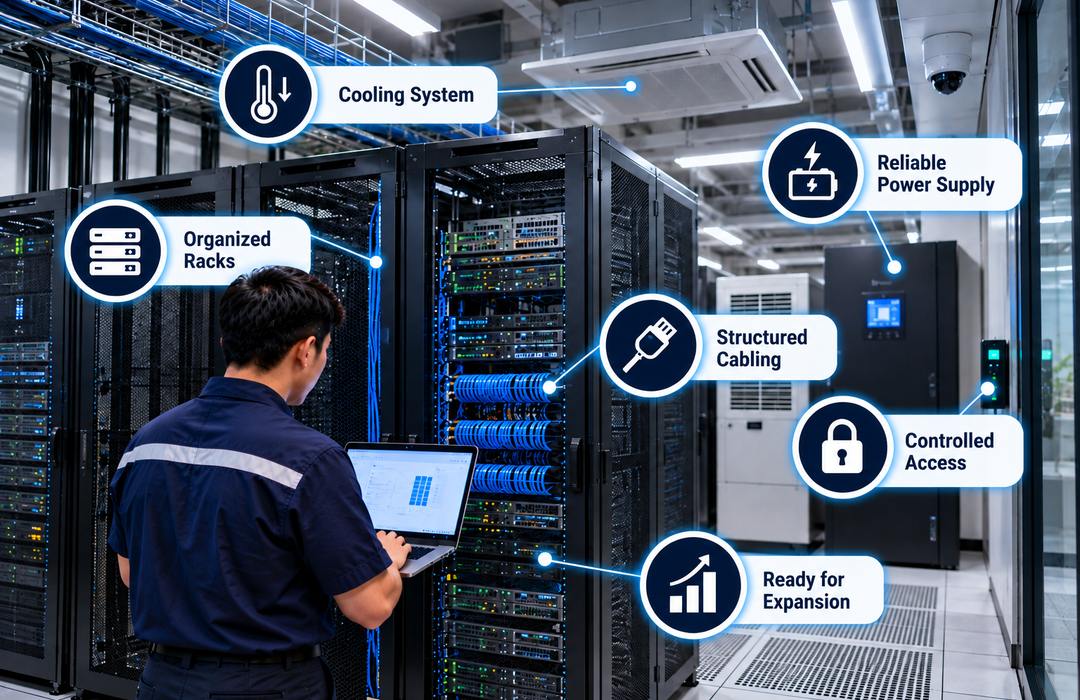
A server room is more than a space with racks and computers. It needs stable power, proper cooling, organized cabling, controlled access, and enough room for technicians to work safely around the equipment. These supporting systems help reduce the risk of overheating, unexpected shutdowns, damaged connections, and unauthorized access.
The exact setup depends on how much equipment the organization operates and how critical that equipment is to daily work. A small office server room may contain only a few racks, while a larger business may need separate network cabinets, backup power, dedicated cooling, environmental monitoring, and tighter physical security.
Foxcon Total Solutions, Inc. provides Server Room Infrastructure for offices, industrial facilities, hospitals, schools, government agencies, financial organizations, and other businesses that depend on secure and organized IT environments.
Why Choose Server Room Infrastructure?
Servers and network equipment can fail even when the hardware itself is in good condition if the room around them is poorly planned. High temperatures can affect equipment performance. Unorganized cabling can make troubleshooting harder. Limited rack space can force technicians to place new equipment wherever room is available. A power interruption can shut down systems that employees depend on throughout the day.
Proper Server Room Infrastructure addresses these practical issues before they become larger problems.
Organized racks and clearly labeled cabling make equipment easier to identify and maintain. Dedicated cooling helps control heat generated by servers and network devices. Backup power gives important equipment time to remain online during short interruptions or shut down properly when necessary.
Physical access also becomes easier to control. Instead of placing critical network equipment in open offices or shared storage spaces, businesses can keep it in a dedicated room where entry is limited to authorized personnel. Planning the room with a spare rack, network, cooling, and power capacity can also make future expansion less disruptive.
How Server Room Infrastructure Works
The server room brings several supporting systems together around the IT equipment. Servers, switches, storage systems, firewalls, and other hardware are mounted inside racks or cabinets. This keeps equipment organized and allows technicians to access the front and rear of devices during maintenance.
Structured cabling connects the equipment to network outlets, fiber links, internet connections, and other parts of the facility. Patch panels and cable managers help keep these connections easier to trace.
Power Distribution Units supply electricity within the racks, while UPS systems can provide temporary backup power and protection during interruptions. Depending on the facility, additional backup power may also be available from a generator or another approved source.
Cooling equipment removes the heat produced by the hardware. Temperature and humidity sensors can alert facility or IT personnel when room conditions move outside the expected range. Security controls such as restricted door access and CCTV may also be used to monitor who enters the room and protect critical equipment from unauthorized handling.
Server Room Infrastructure Safety & Trust
Heat is one of the first issues that should be addressed in a server room. Network and server equipment produces heat continuously, and ordinary office air-conditioning may not always be suitable for rooms that operate around the clock. Airflow also matters. Blocking rack vents, placing equipment too close together, or allowing cable bundles to obstruct airflow can make cooling less effective.
Power should be planned just as carefully. Technicians need to know how much load the racks are using and whether existing circuits, UPS equipment, and Power Distribution Units can safely support additional devices.
The room itself should remain clear and organized. Using server rooms as general storage areas can block equipment access, restrict airflow, and make maintenance more difficult.
Physical access should be limited to employees and contractors who actually need to work with the equipment. Environmental alerts, access records, and regular inspections can provide additional visibility into conditions inside the room.
Foxcon Total Solutions, Inc. can support server room projects through planning, structured cabling, rack installation, power distribution, cooling coordination, network integration, testing, and technical support.
Server Room Infrastructure Tips
-
Leave enough rack space for expected equipment growth rather than filling every available unit immediately.
-
Label cables, patch panels, power connections, and equipment clearly.
-
Keep the front and rear of racks accessible for maintenance.
-
Monitor temperature and humidity instead of relying only on how the room feels.
-
Avoid storing boxes, supplies, or unrelated equipment inside the server room.
-
Check available power capacity before adding new servers or network hardware.
-
Use cable managers to prevent connections from blocking equipment airflow.
-
Restrict room access to authorized personnel.
-
Test UPS equipment and backup power regularly.
-
Review cooling, power, rack space, and network capacity before major IT upgrades.
Give Critical IT Equipment the Space It Actually Needs
A server room often becomes crowded gradually rather than all at once. A company starts with one rack, then adds more switches, storage, security equipment, servers, and backup systems over several years. If every addition is handled as a separate job, the room can eventually become difficult to maintain.
That is why capacity planning matters.
Before installing new equipment, businesses should check whether there is enough rack space, cooling, electrical capacity, network connectivity, and physical room for technicians to work safely.
An assessment can also identify equipment that no longer needs to be there, cables that should be reorganized, racks that need better power distribution, or areas where environmental monitoring would be useful. The goal is not to make the server room look perfect. It is to make critical equipment easier to operate, protect, maintain, and expand.
Frequently Asked Questions
What is Server Room Infrastructure?
Server Room Infrastructure consists of the physical facilities, equipment, and supporting systems that house and protect servers, networking devices, storage systems, and other critical IT hardware required for business operations.
What components are included in Server Room Infrastructure?
A typical Server Room Infrastructure includes server racks, network cabinets, structured cabling, power distribution units, cooling systems, environmental monitoring devices, backup power systems, fire protection, and physical security controls.
Why is a dedicated server room important?
A dedicated server room provides a controlled environment that protects critical IT equipment from overheating, power issues, unauthorized access, and environmental conditions that could affect system reliability.
Can Server Room Infrastructure support other building technologies?
Yes. Server Room Infrastructure supports Network Infrastructure, Building Management Systems (BMS), CCTV, Access Control Systems, Audio Visual Solutions, Public Address Systems, and other integrated building technologies by providing centralized connectivity and equipment management.
Why is preventive maintenance important for Server Room Infrastructure?
Routine inspections, equipment cleaning, power testing, cooling system maintenance, firmware updates, and cable management help maintain reliable server performance, extend equipment lifespan, and reduce the risk of unexpected downtime.
Create the Right Environment for Business-Critical Systems
Support your critical IT equipment with properly organized Server Room Infrastructure. From racks, power, cooling, cabling, network equipment, and monitoring to installation and maintenance, Foxcon Total Solutions, Inc. can help create a dependable server room environment.
📞 Contact us today to discuss your server room infrastructure requirements.
📍 Serving businesses in Cebu, Metro Manila, and nationwide.
🌐 Explore Foxcon’s solutions to learn more about our services.
References
-
Vertiv – What Is a Server Room?
https://www.vertiv.com/en-asia/about/news-and-events/articles/educational-articles/what-is-a-server-room/ -
Liquid Web – Server Room Guide
https://www.liquidweb.com/blog/server-room/ -
PodTech Data Center – Server Room Infrastructure: What Growing Businesses Need to Keep Their Operations Running
https://podtechdatacenter.com/server-room-infrastructure-what-growing-businesses-need-to-keep-their-operations-running/ -
Colonel Server – Building a Server Room
https://colonelserver.com/blog/building-server-room/ -
Sino Corporation – Server Room Infrastructure
https://www.sinocorp.com/en/services-solution/server-room-infrastructure/