


News and Events
Enterprise Server Solutions Philippines: Building a Reliable Core for Business Applications and Data
What Are Enterprise Server Solutions?
Enterprise Server Solutions Philippines provide the computing foundation that businesses use to run applications, manage databases, store shared files, support user accounts, and keep important digital services available across the organization.
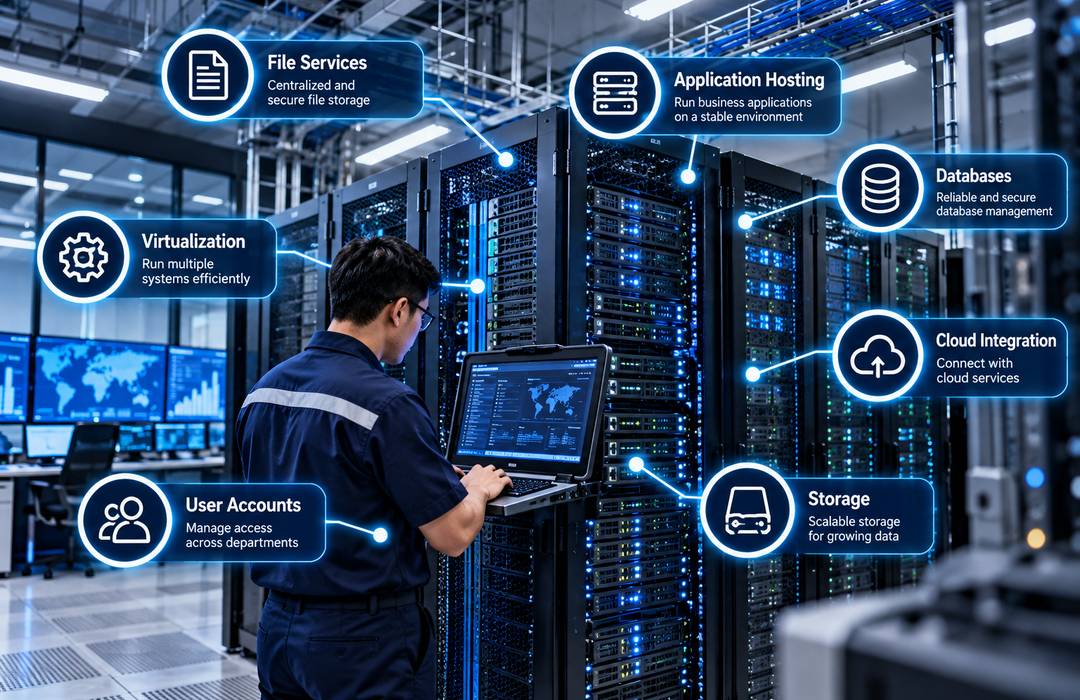
Unlike ordinary desktop computers, enterprise servers are built for heavier workloads, longer operating hours, and environments where multiple users may depend on the same system at the same time. They can be configured for file services, application hosting, databases, virtualization, email, storage, cloud-connected workloads, and other business functions.
The right server setup depends on what the organization actually needs to run. A small office may only require a few shared applications and centralized storage, while a hospital, manufacturing facility, or financial organization may need several servers with redundancy, backup, and higher processing capacity.
Foxcon Total Solutions, Inc. provides Enterprise Server Solutions for offices, hospitals, schools, manufacturing facilities, hotels, government agencies, financial institutions, and other organizations that depend on stable business systems.
Why Choose Enterprise Server Solutions?
Businesses often outgrow scattered computers and storage devices. When important files, applications, and user accounts are spread across separate machines, administration becomes harder. Backups may be inconsistent, access may be difficult to control, and employees can lose time when one device fails.
An Enterprise Server Solution gives the organization a more controlled place to run important services.
Applications can be hosted centrally instead of installed separately on every workstation. Shared data can be stored in one managed environment. User access can also be handled more consistently across departments. Virtualization can make better use of server hardware by allowing several virtual servers to run on one physical machine. This can be useful when an organization needs separate environments for different applications but does not want a dedicated physical server for every workload.
The key is to size the system according to the applications, users, storage, and performance requirements it will actually support.
How Enterprise Server Solutions Work
A server receives requests from users, devices, or applications and processes them centrally. For example, when an employee opens a shared business application, the server may handle the application processing and provide access to the required database or files.
Different servers may be assigned different roles. One may host databases, another may provide shared storage, while others may run virtual machines, business applications, authentication services, or backup processes.
Enterprise servers can also use multiple processors, larger memory capacity, redundant power supplies, and several storage drives to support higher workloads and improve availability. RAID can combine multiple drives in ways that provide performance, redundancy, or both, depending on the configuration. It is useful for protecting against certain drive failures, but it should not be treated as a replacement for a proper backup strategy.
Administrators can monitor processor use, memory, storage health, temperatures, network activity, and other system conditions through server management tools.
Enterprise Server Solutions Safety & Trust
Server reliability starts with proper sizing. Buying a system that only meets today’s minimum requirements can create performance problems when more users or applications are added. Oversizing without a clear reason, however, can increase cost without providing meaningful value.
Data protection also needs several layers. RAID can help with drive failure, while backups protect against other problems such as accidental deletion, corrupted files, ransomware, or wider system failure. Critical systems may also require a disaster recovery plan.
Physical conditions matter as well. Servers should be installed in suitable racks or cabinets with stable power, proper cooling, organized cabling, and controlled access. Software and firmware should be kept current, and administrator access should be restricted. Security patches, account permissions, backups, and monitoring should be treated as routine server management rather than occasional tasks.
Foxcon Total Solutions, Inc. can support server projects through assessment, hardware planning, deployment, configuration, virtualization, testing, integration, preventive maintenance, and technical support.
Enterprise Server Solutions Tips
-
List the applications and services the server will actually run before choosing hardware.
-
Estimate future users and storage growth rather than sizing only for current demand.
-
Monitor processor, memory, and storage use to identify capacity problems early.
-
Use redundant components where downtime would seriously affect operations.
-
Keep server backups separate from the primary storage environment.
-
Test whether backups can actually be restored.
-
Do not treat RAID as a replacement for backup.
-
Keep operating systems, firmware, and security updates current.
-
Limit administrator access to personnel who actually need it.
-
Review server capacity before adding major applications or virtual machines.
Plan for Failure, Not Just Normal Operation
A server design should not only answer the question, “Can it run our applications today?” It should also answer what happens when something fails.
If one storage drive stops working, can the system continue? If a power supply fails, does the server have another one available? If the server itself becomes unavailable, how quickly can the organization restore its important applications and data? These questions become more important as more employees depend on the same infrastructure.
A business may also need to decide which workloads are truly critical. A file archive may tolerate a longer recovery time, while an application used for daily operations may need to return much faster.
A professional assessment can help identify processing requirements, memory capacity, storage design, virtualization needs, backup strategy, redundancy, and the supporting power and network infrastructure required for each workload. The goal is to build a server environment that is not only fast when everything is working, but manageable when something goes wrong.
Frequently Asked Questions
What is an Enterprise Server?
An Enterprise Server is a high-performance computer designed to store, process, and manage business applications, databases, files, and network services for multiple users across an organization.
Which businesses need Enterprise Server Solutions?
Enterprise Server Solutions are commonly used by corporate offices, manufacturing facilities, hospitals, schools, financial institutions, government agencies, hotels, and businesses that rely on centralized data management and critical applications.
What are the benefits of Enterprise Server Solutions?
Enterprise servers provide centralized data and application management, improved resource control, support for virtualization, higher reliability options, and the ability to scale computing capacity as business requirements grow.
Can Enterprise Server Solutions integrate with other IT infrastructure?
Yes. Enterprise Server Solutions can work with Network Switch Solutions, Enterprise Firewall Solutions, Server Room Infrastructure, Backup Power Systems, Enterprise Wi-Fi, storage systems, and cloud services to support a complete business IT environment.
Why is preventive maintenance important for Enterprise Server Solutions?
Routine inspections, hardware diagnostics, firmware updates, operating system patches, storage monitoring, backup checks, and preventive maintenance help reduce unexpected failures and keep critical systems available.
Power Critical Business Operations With Enterprise Servers
Support critical applications, data, and business operations with professionally planned Enterprise Server Solutions. From server infrastructure and networking to storage, deployment, integration, testing, and maintenance, Foxcon Total Solutions, Inc. can help develop a server environment suited to your organization.
📞 Contact us today to discuss your enterprise server requirements.
📍 Serving businesses in Cebu, Metro Manila, and nationwide.
🌐 Explore Foxcon’s solutions to learn more about our services.
References
-
HPE – Enterprise Server Solutions
https://www.hpe.com/us/en/solutions/enterprise-server-solutions.html -
IBM – Server Solutions
https://www.ibm.com/solutions/servers -
Hypertec – Enterprise Servers
https://hypertecsp.com/knowledge-base/enterprise-servers/ -
ADATA – Enterprise Server Solutions
https://www.adata.com/en/applications/enterprise-server/ -
ServerMo – Dedicated Server Solutions
https://www.servermo.com/dedicated-server/solutions/